info.youngmindsacademy@gmail.com
Opening Hours : Monday to Friday - 8 Am to 5 Pm
 info.youngmindsacademy@gmail.com
Opening Hours : Monday to Friday - 8 Am to 5 Pm
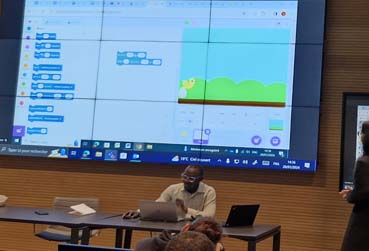
In Scratch, you utilize interlocking blocks akin to building blocks, enabling the creation of interactive animations, stories, games, and simulations. It is intentionally user-friendly, featuring a drag-and-drop interface that empowers individuals to craft their own programs, all without the necessity of comprehending intricate coding languages
Our 'Exploring Scratch Programming' course offers an engaging and interactive avenue for children between the ages of 6 and 15 to delve into the fundamentals of programming. Throughout this curriculum, students will acquire a solid foundation in Scratch, learning the ropes of crafting interactive animations, games, and captivating stories.
- Access to a computer or laptop with an internet connection.
- A free Scratch account, which can be easily created at scratch.mit.edu.
- An enthusiastic desire to learn and have a good time!
By the end of this course, students will have accomplished the following:
1. Proficiency in crafting interactive animations, games, and stories through Scratch.
2. An understanding of fundamental programming concepts, encompassing variables, loops, and conditionals.
3. Enhanced problem-solving capabilities and the ability to think logically.
4. The skill to collaborate effectively and share their creations with others in an online environment.
In this session, students will become acquainted with Scratch, a user-friendly visual programming language tailored for young learners. They will explore the various components of the Scratch interface and embark on their journey to create their inaugural program. .
"Sprite in Motion"
During this activity, students will construct a straightforward program using Scratch to set a sprite in motion, allowing it to traverse the screen.
Game Design Challenge.
During this activity, students will harness variables, loops, and conditionals to craft a simple game in Scratch.
In this session, students will become versed in acquiring input from users and showcasing output on the screen. They will discover the utilization of buttons, text boxes, and other input and output components within Scratch.
"Quiz Maker Challenge"
During this activity, students will engineer a basic quiz program in Scratch. This program will engage users with multiple-choice questions and display the results interactively.
In this session, students will gain insights into the creation of interactive programs through the integration of events and user interactions. They will become proficient in employing Scratch's pre-built event blocks to develop programs that dynamically respond to user input and interactions.
During this activity, students will design a basic game in Scratch that harnesses the arrow keys to control a sprite's movement and gather points, rendering the experience interactive and engaging.
During this session, students will delve into the art of crafting animations and graphics within Scratch. They will master the utilization of Scratch's pre-built drawing blocks to fashion personalized sprites and backgrounds.
"Walking Character Animation" In this activity, students will embark on the journey of creating an animation depicting a character walking, effectively employing Scratch's features and tools.
In this session, students will acquire the skills needed to integrate sound and music into their Scratch programs. They will gain proficiency in the utilization of Scratch's embedded sound blocks to develop programs that produce sound effects and music.
During this activity, students will engage in the creation of a straightforward game in Scratch, incorporating various sound effects that respond to the user's actions. This brings an element of interactivity and auditory richness to the gaming experience.
In this session, students will be initiated into the fundamentals of game design. They will discover how to draft a game plan, fashion game characters and levels, and implement game mechanics effectively.
In this session, students will transform their game plan and design concepts into a tangible game by utilizing Scratch. They will apply the skills they've cultivated throughout the preceding weeks to produce a fully operational game.
During this activity, students will employ Scratch to realize their game vision, aligning with the game plan and design concepts they formulated in the prior session.

I am Ibidunni Ridwan, an alumna with a degree in Mathematics from Adekunle Ajasin University, currently pursuing a master's degree in Collective Intelligence at University Mohammed VI Polytechnic (UM6P). My journey into programming ignited during my undergraduate studies and has evolved into this thrilling adventure. As your mentor at YoungMindAcademy, I am eager to guide you through the captivating realm of coding and programming. Fueled by a deep passion for education and technology, I bring a decade of experience to the classroom, fostering an interactive and supportive environment for young learners.

There are many variations of passages of Lorem Ipsum available, but the majority have suffered alteration in some form, by injected humour, or randomised words which.

There are many variations of passages of Lorem Ipsum available, but the majority have suffered alteration in some form, by injected humour, or randomised words which.

There are many variations of passages of Lorem Ipsum available, but the majority have suffered alteration in some form, by injected humour, or randomised words which.